
CREATE SCHEMA FROM SHARE
功能
CREATE SCHEMA FROM SHARE语法
参数说明
new_schema_name: 基于 share 中的数据创建在本地数仓中的 schema 名称;注意该 schema 不可与工作空间中其他 schema 重名,且该 schema 创建后为只读 schema,不可在其中创建其他数据对象。
instance_name.share_name: 被提取的 share 名称。因不同服务实例可能共享同名的 share 对象,所以需要在 share 名称前加上 instance 名称以准确标识一个唯一的 share 对象。该信息可以通过具备实例管理员(instance_admin)或工作空间管理员(workspace_admin)角色的用户,执行
show shares;
schema_name: 指需要被提取的数据。提取数据是以 schema 为单位的,语句执行后 new_schema_name 中所包含的数据对象(table、view 等)与 share 中 schema_name 下所包含的数据对象一致。所以这里需要填入要提取的 share 中的 schema_name。
该信息可以通过具备实例管理员(instance_admin)或工作空间管理员(workspace_admin)角色的用户,执行
desc share <instace_name>.<share_name>;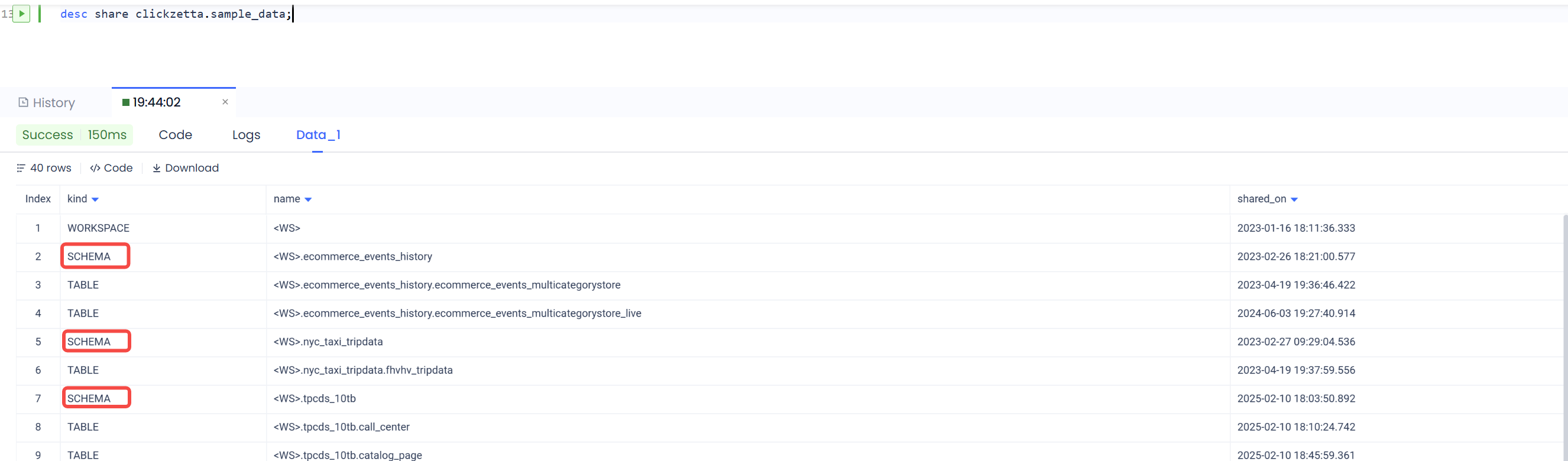
示例
从服务实例 y237xm2x 分享来的 share_demo,提取其中 sample_schema 中的数据至当前工作空间中的 schema:data_from_share_demo 中。
挂载完成后,可以像查询本地表一样直接查询共享数据,也可以与本地表做关联查询:
相关语句
联系我们